Automated regulatory reporting software benefits and workflows

Michael Iyiola
Co-Founder, CWORT
Learn how automated regulatory reporting software organises data, approvals and submissions in governed workflows, with ownership and audit-ready evidence.

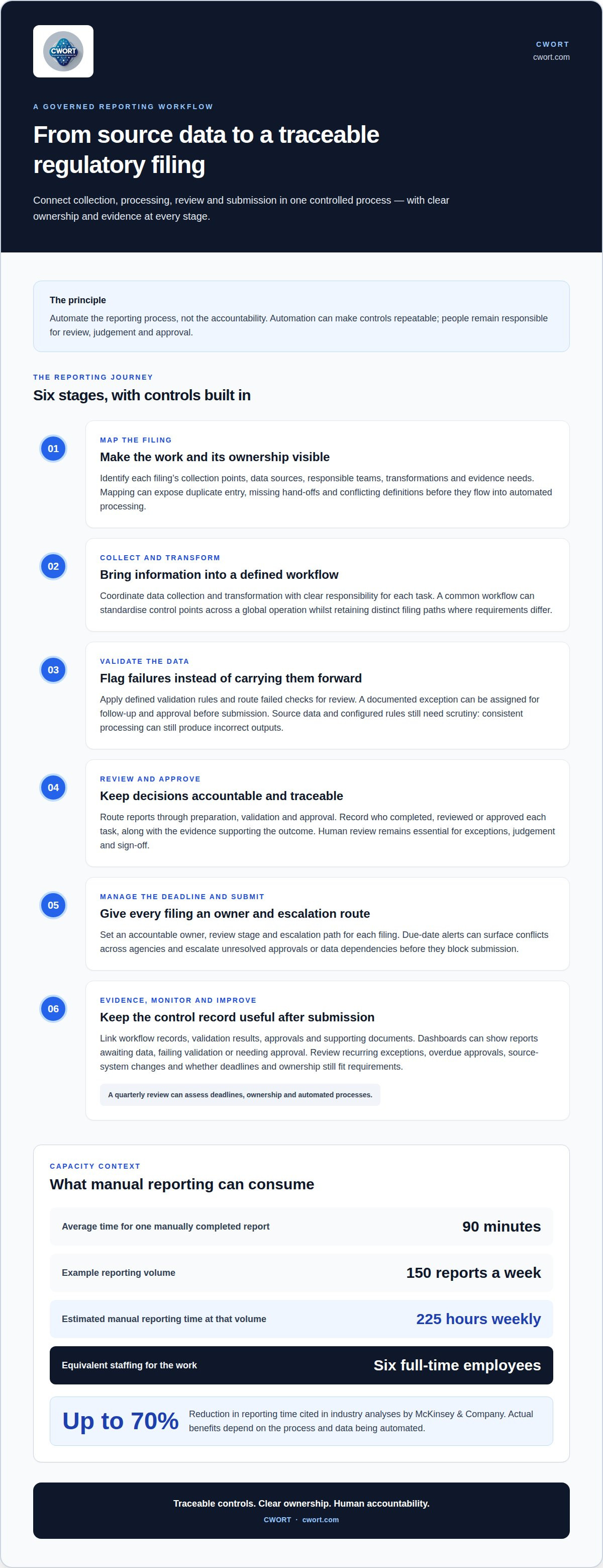
Automate the reporting process, not the accountability. Automated regulatory reporting software can coordinate data collection, transformation, validation and submission within a governed workflow, helping teams manage deadlines, approvals and evidence in one controlled process. The objective is not simply to produce a filing faster; it is to make each stage traceable and repeatable.
When regulatory reporting relies on disconnected systems and manual hand-offs, it can be difficult to see who owns the next action, whether information has been validated or what evidence supports a submission. Automated regulatory reporting software can structure this work while keeping people accountable for review and decisions.
This guide explains how reporting automation works, where it can strengthen enterprise reporting, and what to consider when managing deadlines, processing data and preparing submissions. It also explains how governed workflows support auditable evidence and which implementation factors help move from current processes to more controlled reporting.
Key Takeaways
- Map reporting tasks from data collection through submission to expose hand-offs, ownership and points where manual work creates risk.
- Build approval controls, separation of duties and evidence trails into reporting workflows so decisions remain traceable.
- Manage overlapping deadlines through clear accountability, escalation paths and regular reviews of reporting processes.
- Assess implementation by looking at data sources, validation needs and existing workflows, not just the software deployment timeline.
- Where regulatory obligations need structured assessment and control mapping, CWORT’s relevant readiness and compliance offerings can provide a practical next step.
Table of Contents
- How Does Regulatory Reporting Automation Benefit Your Enterprise?
- Governed reporting workflows and submission deadlines
- What is regulatory compliance software?
- Deployment speed and implementation timelines
- Automated collection, transformation, validation and submission
- CWORT
How Does Regulatory Reporting Automation Benefit Your Enterprise?
Automated regulatory reporting software is useful when it makes controls repeatable, data traceable and submissions easier to evidence. Its value depends on how well workflows connect people, information and approval decisions.
Automated controls and audit trails
Automated controls apply defined rules and record the steps taken across a reporting workflow. Teams can trace who completed, reviewed or approved each task, and what evidence supported the outcome.
For example, a workflow can route a report through preparation, validation and approval, recording each action in an audit trail. If a value fails a configured check, the process can flag it for review instead of carrying it forward unnoticed. The result is a consistent activity record, not a collection of disconnected spreadsheets and email approvals.
Automation can reduce repetitive work, but it does not transfer accountability away from the organisation. Key risks include inaccurate source data, poorly configured rules and flawed workflow design. These can produce consistent but incorrect outputs, so human review remains essential for exceptions, judgement and approval.
Security compliance also depends on controlling access to reporting evidence. A governed process can link a control outcome to its supporting documents and record the related review activity. This gives audit teams a clearer route from a reported result to the evidence behind it, rather than requiring staff to reconstruct decisions from separate files.
Deterministic workflows apply the same defined steps to the same inputs, producing outputs that can be reviewed and reproduced. For example, a validation failure can trigger a documented exception, assigned follow-up and approval before submission. This structure helps teams distinguish a completed control from an unresolved issue and preserve evidence for later scrutiny.
Accuracy, speed and cost benefits
Automation supports accuracy through consistent validation rules and saves time by reducing manual handling. This matters when reporting volume makes repeated data entry and reconciliation a drain on operational capacity.
A manually completed regulatory report takes an average of 90 minutes. An organisation filing 150 reports a week spends an estimated 225 hours weekly on manual reporting, equivalent to six full-time employees for the work. McKinsey & Company has cited industry analyses indicating that automation can reduce reporting time by up to 70%. These figures show where capacity may be released; actual benefits depend on the process and data being automated.
For audit readiness, the practical benefit is collecting evidence as part of routine operations. Teams can link workflow records, validation results, approvals and supporting documents, reducing reliance on retrospective searches. This makes unresolved exceptions more visible and helps leaders assess reporting performance alongside the controls that support it.
Governed reporting workflows and submission deadlines
A governed reporting workflow assigns ownership, approvals and escalation paths for each filing. It helps teams coordinate overlapping deadlines while maintaining oversight as requirements change.
Adapting to changing filing requirements
Adaptable workflows let teams update controls, data fields and approvals when filing requirements change, rather than relying on fixed task sequences. An outdated workflow may keep routing information without reflecting a revised requirement. For example, a change to a required data field should prompt updates to its source, validation rule, reviewer and submission check, with the change recorded for traceability.
Deadline management takes more than a calendar entry. A controlled process assigns each filing an accountable owner, review stage and escalation route, then surfaces conflicts across agencies. Alerts can be configured around due dates and escalated when an approval or data dependency remains unresolved. A quarterly review can assess whether deadlines, ownership and automated processes still fit regulatory requirements and business needs.
Dashboards turn workflow activity into operational visibility. They can show which reports are awaiting data, have failed validation or need approval. An investigation workflow can assign an exception to a named role, record its cause and track resolution. For example, a missing source value can be escalated before it blocks a filing, rather than discovered during final review.
Workflow prerequisites and fragmented data
Automation requires clear reporting ownership, mapped data sources, agreed validation rules and defined approval responsibilities. Software can streamline a process only when teams know what information to collect and how to handle exceptions. In a global operation, a common workflow can standardise control points while retaining distinct filing paths where requirements differ.
Fragmented compliance workflows can undermine accuracy when a report draws on spreadsheets, email approvals and separate operational systems. Teams may have to reconcile inconsistent versions manually, without a clear record of which dataset informed a decision. Before automating, map each filing’s collection points, responsible teams, transformations and evidence needs. This reveals duplicate entry, missing hand-offs and conflicting definitions that could otherwise carry into automated processing.
Keep monitoring active after launch. A quarterly review can examine recurring exceptions, overdue approvals and changes to source systems, then direct workflow updates to the right owners. This creates a controlled feedback loop instead of treating configuration as a one-off task. To discuss how a governed compliance workflow could support your reporting process, request a demonstration.
Assess whether filing software enforces separation of duties in approval workflows, manages overlapping deadlines across agencies, and lets teams configure and escalate deadline alerts.
What is regulatory compliance software?
Regulatory compliance software helps an organisation translate obligations into tracked controls, tasks and evidence. For a financial institution, it can link a rule or framework to accountable owners, review activity and reporting records. Centralising this work matters when teams manage several reporting processes across business units. The system supports oversight, but the institution remains responsible for decisions and submissions.
Financial institutions face overlapping reporting and data governance demands. MiFID II and EMIR are examples of frameworks associated with reporting, whilst BCBS 239 focuses on risk data aggregation and reporting. Requirements can touch different systems and teams, so the same information may need to be gathered, checked and approved through separate processes. A compliance platform can help organise those controls and expose gaps between an obligation, its owner and the evidence available.
Monitoring features can apply defined rules to incoming information and flag exceptions for review. For example, a threshold alert can route an unusual value to an assigned team member, who records the investigation and outcome. Dashboards can show open issues, completed assessments and overdue actions. These tools make status visible, but do not establish that every input is accurate. Staff still need to assess exceptions and resolve data-quality problems.
Regulatory updates also need to reach the people responsible for affected controls. A structured process can record a change, identify relevant policies or reporting activities, assign a review and track completion. Training records can show who received role-specific guidance and whether follow-up remains outstanding. For an institution operating across jurisdictions, separate requirement mappings can distinguish local processes while retaining common governance and oversight.
Software features should match the organisation’s reporting and control needs. Useful capabilities may include obligation mapping, task ownership, approval workflows, alerts, evidence records, dashboards and audit history. ISO 27001 is an information security standard identified by the International Organization for Standardization. Where security assurance matters, assess how the platform supports access control and evidence handling against the organisation’s own requirements, rather than treating a feature label as proof of compliance.
Compare pricing against the actual scope, not a feature count alone. The price depends on the case and is given after a quote request; relevant cost factors include user numbers, reporting volume, integrations, jurisdictions and implementation requirements. For example, an institution consolidating several reporting workflows may need different configuration from one managing a single control assessment. A clear scope helps connect platform capabilities with operational needs and supports a more meaningful comparison.
Compliance software is most useful when it links requirements to accountable work and reviewable evidence. Financial institutions can use this structure to monitor controls, coordinate updates and investigate exceptions. The practical test is whether the organisation can trace a reporting outcome to its source information, review and approval. That traceability supports governance, while qualified staff remain responsible for interpreting requirements and making decisions.
Deployment speed and implementation timelines
Implementation time depends on the scope of reporting workflows, data connections and controls being configured. Conventional regulatory environments can involve timelines of 9 months, whilst traditional enterprise software or GRC suites can take 9 to 12 months. Modern compliance automation workflows can be deployed in days or weeks. These timelines describe different approaches, not a guaranteed duration for every organisation.
A focused scope helps get deployment started. Select a reporting process, identify its owners and document the information it uses. For example, a team could begin with one recurring report, mapping its source data, validation steps, approval roles and evidence requirements. This creates a clear implementation target and reveals integration needs before automation extends to other operations.
Next, establish how platforms will exchange information. An implementation plan should identify source systems, data formats, access permissions and transfer controls. For example, connecting an ERP system to a reporting workflow requires clear field mappings and validation rules. Testing these mappings with representative records can reveal errors before live reporting relies on them. IT teams can assess integration constraints alongside compliance owners.
Regulatory updates need a managed route into the configured process. Record the change, identify affected controls and data fields, assign an owner, then update workflow rules and guidance. A change to a required reporting field, for instance, may affect collection, validation and review. Testing the revised process before release helps identify broken mappings or missed approvals. Retain change records to show what changed and who approved it.
Implementation also requires decisions about roles and support. Compliance teams define reporting outcomes and control requirements; IT teams manage access, integrations and technical issues. Assigning these responsibilities early reduces delays caused by unclear ownership. A documented process for logging incidents, prioritising defects and approving configuration changes helps maintain control after launch. Staff also need guidance on handling exceptions, so alerts prompt consistent investigation rather than untracked workarounds.
Release in stages instead of switching every report at once. A pilot can test one workflow against existing outputs, including validation results, approvals and evidence records. Resolve discrepancies, document their causes and adjust controls before expanding deployment. This makes errors visible within a limited process and helps operational teams assess readiness for wider use.
After deployment, assign ongoing ownership for platform configuration, integration changes and regulatory updates. Review workflow performance, unresolved incidents and control coverage regularly. These activities help prevent an initial implementation from becoming static as reporting processes evolve. The timeline depends on scope, data readiness, integration complexity and the governance needed to maintain dependable outputs.
Automated collection, transformation, validation and submission
A reporting pipeline connects source systems to a filing, transforming data before validation and submission. Platforms validate records against configured rules, log processing and approval actions, then route rule changes through controlled review.
Data collection and transformation
Automated collection extracts reporting information from systems such as ERP platforms, document management systems and compliance databases. This matters because a filing assembled from separate sources can otherwise require repeated manual transfers. Transformation then maps collected fields into the structure required for a report, helping compliance teams apply consistent definitions across records.
For example, a transaction value may have one field name in an ERP system and another in a reporting template. A mapping rule connects the fields and applies the required format. Pre-built connectors can support data transfer, but teams still need to assess whether information remains intact between systems. Clear source ownership also helps trace discrepancies to their origin.
Validation and audit trails
Data validation applies defined checks to collected and transformed information before it moves towards submission. Missing fields, inconsistent formats or values outside configured rules can then be identified for review. A failed check can create an exception for a responsible reviewer instead of allowing questionable data to pass unnoticed.
Audit trails should record the source, transformation, validation result and subsequent review. For example, if a record is corrected after a failed check, the original issue, the change and its approval history should remain visible. This sequence supports traceability and helps teams explain how a filing was produced. It also distinguishes automated checks from human decisions.
Handling regulatory rule changes
Rule changes require controlled updates to reporting logic, validation criteria and affected data mappings. An old rule can continue producing consistent outputs that no longer meet filing requirements. Assess each change, assign an owner, test it against sample data and approve it before using the revised workflow.
After approval, the platform can apply updated rules to relevant reports and preserve a record of the change. Automated systems can generate and submit reports in approved formats such as XBRL and XML. AI, machine learning and robotic process automation can also support document handling, but configured controls and review remain important for reliable outputs.
To assess how controlled data flows, validation and evidence could support your reporting, request a demonstration.
Regulatory filing automation can use AI, machine learning and robotic process automation to help manage required documents and submissions. These technologies support document handling within a reporting process; controls and review remain important to govern the resulting work.
CWORT
CWORT helps organisations turn regulatory obligations into structured activities, accountable workflows and auditable compliance evidence. The platform enforces separation of duties and links evidence to control outcomes, giving teams a clear basis for showing how controls are addressed. It can support organisations managing fragmented compliance tracking or assessing readiness against applicable requirements.
Related work includes DORA Compliance Readiness and Assessment, UK NIS Compliance Management, NIS2 Readiness and Compliance Management, and ISO 27001 Readiness and Control Mapping. These offerings focus on compliance readiness and control mapping, rather than replacing an organisation’s responsibility for regulatory decisions or submissions.
To discuss how CWORT can support your compliance workflows, contact CWORT.
Make reporting control part of the operating model
Choosing automated regulatory reporting software is an operating-model decision, not simply a technology purchase. Define the outcomes you need, the teams accountable for them and how reporting evidence will support oversight. This gives implementation direction and helps keep automation aligned with business controls as processes evolve.
Where regulatory readiness and control mapping are also priorities, CWORT offers DORA Compliance Readiness and Assessment, UK NIS Compliance Management, and NIS2 Readiness and Compliance Management. These services can help organisations structure their approach to the relevant requirements alongside their reporting processes.
Set the next step around your organisation’s reporting priorities and governance needs. Contact CWORT to discuss reporting and explore a practical path towards more controlled, evidence-led compliance operations.
Frequently Asked Questions
What is automated regulatory reporting software and how does it work?
Automated regulatory reporting software helps organise the preparation and submission of regulatory reports. A typical process brings relevant data into a reporting workflow, applies configured checks, flags exceptions and routes results for review. For example, a failed data check can be assigned for investigation before a report proceeds. Automation supports execution and traceability, but accountable staff remain responsible for interpreting requirements and approving decisions.
What are the key features to compare in regulatory reporting platforms?
Compare how each platform handles your actual reporting scenarios, not just its feature list. Assess data-source connections and transfer integrity, configurable validation, role-based approvals, separation of duties, evidence retention and change control. Check whether outputs meet the formats your reporting process requires. A practical evaluation uses a representative report to test how the platform handles an exception, a revised rule and the associated review record.
How much does regulatory reporting software cost in the UK?
There is no single price that applies to every organisation. CWORT’s SaaS subscription fees are tiered according to the number of regulatory frameworks managed and organisational scale. Professional implementation fees cover work such as configuring control models and mapping organisational obligations. Scope, framework coverage and implementation requirements therefore affect the overall cost. Request a quote for the relevant requirements; no specific price is provided here.
What steps are involved in selecting and implementing regulatory reporting software?
Start by defining the reports, obligations and business outcomes the system must support. Then map source data, accountable roles and approval needs before configuring the workflow. Test a representative report, including exceptions and evidence records, before wider deployment. Finally, prepare users for their responsibilities and establish ownership for updates and ongoing review. This sequence helps identify process or data issues before they affect routine reporting.
How do automated regulatory reporting tools integrate with finance, risk and core banking systems?
Regulatory filing systems can connect to ERP systems, document management platforms and compliance databases to extract, validate and route filing data. Assess available pre-built connectors and how data integrity is maintained during transfers.
Disclaimer
The content on this site is provided for general information and educational purposes only. It does not constitute legal, regulatory, financial, or professional advice. CWORT provides AI-assisted insights and workflow automation, but all compliance decisions remain the responsibility of your organisation and its management. Always seek qualified legal or regulatory guidance for decisions relating to the UK NIS Regulations, CAF, DORA, NIS2, ISO 27001, or other obligations.
Related posts
DORA Compliance Validation: A Guide for Financial Institutions
Master DORA compliance validation. Our guide shows you how to replace risky manual tracking with an automated, auditable system for definitive regulatory proof.
Four ways to understand and reduce human error in compliance
Discover four ways of reducing the risk of human error in compliance, investigating near misses and improving controls, procedures and cyber risk management.
How to Demonstrate Control Effectiveness to Regulators: A Strategic Guide
Learn how to demonstrate control effectiveness to regulators with our guide. Shift from chaos to an evidence-based, audit-ready compliance programme today.
Article by
Michael Iyiola
Co-Founder, CWORT
Michael Iyiola is a co-founder of CWORT and a Cyber and AI Security Engineer with deep experience in vulnerability management, detection engineering and operational resilience across UK critical national infrastructure, including rail, energy and financial services. At CWORT, he designs scalable, evidence-driven workflows that help teams meet modern regulatory and security demands.
Build Your Foundation of Auditable Certainty
Take control of your regulatory obligations and secure your infrastructure with CWORT.