Orchestrating compliance vs managing tasks: How they work together

Michael Iyiola
Co-Founder, CWORT
Explore orchestrating compliance vs managing tasks, and see how connected workflows align automation, ownership and evidence to improve audit readiness.

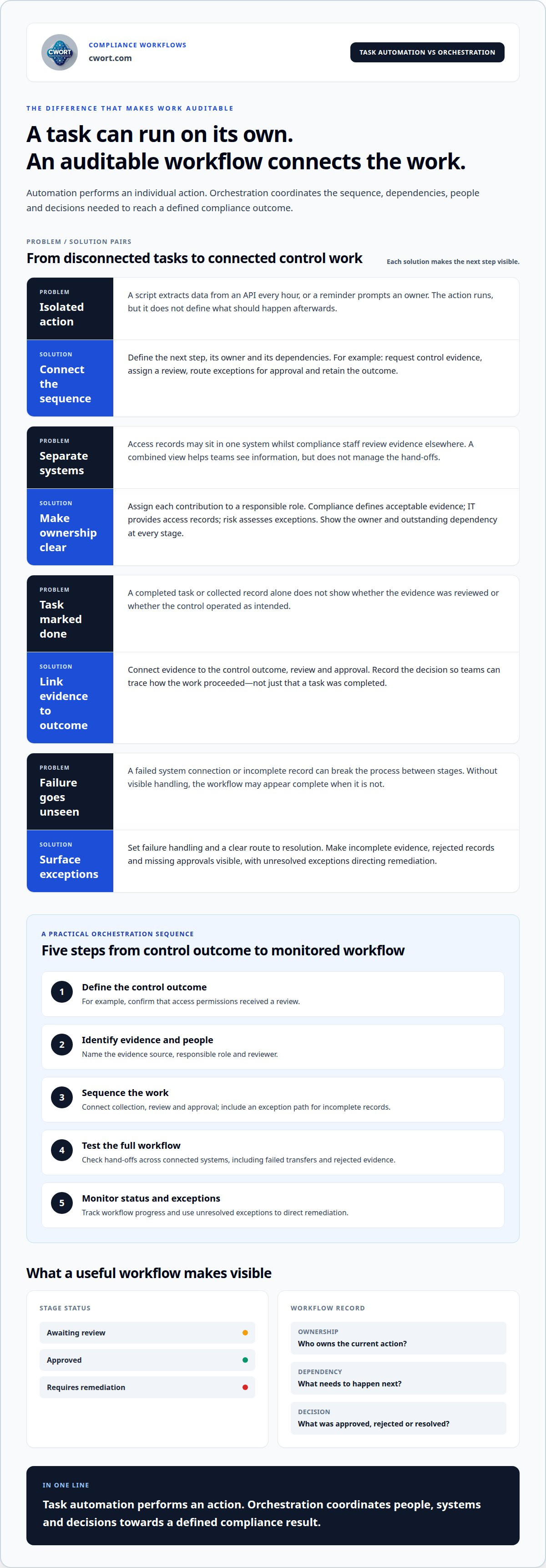
Automating compliance tasks does not, by itself, create an auditable process. Orchestrating compliance vs managing tasks comes down to the difference between automating individual actions and coordinating the sequence, dependencies and people needed for an end-to-end workflow. Both approaches are useful, but they solve different problems.
Task automation can collect evidence or prompt an owner to complete an activity. Orchestration connects those actions so evidence, approvals and security controls follow a defined process instead of remaining in separate task lists. That distinction matters when compliance, risk and IT teams share responsibility.
This article explains how the approaches work together: where automation fits, how orchestration coordinates work across teams and systems, and how identity permissions and control evidence can be built into a process. It also shows what changes when compliance is managed as a connected workflow, and why completing tasks is only part of demonstrating that controls operate as intended.
Key Takeaways
- Distinguish individual task automation from workflows that coordinate dependencies, approvals and evidence across an end-to-end process.
- Clarify ownership across compliance, risk and IT so each activity has an accountable team and a clear hand-off.
- Build security controls and appropriate access permissions into workflow steps, rather than treating them as separate checks.
- Use task management to assign, track and complete compliance work, while recognising where tracking alone cannot demonstrate control outcomes.
- Assess whether a structured compliance approach can strengthen readiness for frameworks such as DORA, UK NIS, NIS2 or ISO 27001.
Table of Contents
- Task-level automation versus end-to-end workflow orchestration
- Collaboration across compliance, risk and IT teams
- Security controls, identity management, and compliance protocols
- What does compliance orchestration mean?
- What does task management mean in a compliance context?
- CWORT
Task-level automation versus end-to-end workflow orchestration
Task automation performs a defined action; orchestration coordinates connected actions across a compliance workflow. A Python script that extracts data from an API every hour automates a task. By contrast, an evidence workflow might request a control record, assign its review, route exceptions for approval and retain the outcome. Each action has a place in the sequence rather than operating as a separate job.
This distinction matters when work spans systems and environments. A security team may store access records in one system while compliance staff review evidence elsewhere. Automation can retrieve a record or send a reminder. Orchestration defines what happens next, who owns the next step and how to handle incomplete evidence. Aggregating records into one view helps teams see information, but does not by itself manage dependencies between actions.
Compliance orchestration software should support defined workflow steps, dependencies, ownership, approvals, evidence linked to control outcomes and monitoring across the process. It should also surface exceptions so a failed action or missing approval cannot appear as a completed workflow.
Workforce strategy needs to align with business strategy through clear accountability. For example, if a business assigns a control review to an information asset owner, the workflow should route it to the responsible role and identify the next approver. Clear assignments help compliance, risk and IT teams coordinate work without confusing task completion with control validation.
Monitoring shows teams the progress of a workflow, not just individual job logs. A defined status for each stage can show whether evidence is awaiting review, approved or requires remediation. Retry rules and failure handling matter too: if a system connection fails during evidence collection, the workflow needs a visible exception and a clear route to resolution. This helps prevent silent breaks between stages.
To implement compliance orchestration, map the control outcome to its evidence, owners, dependencies and approval points. Then configure the workflow, test its hand-offs and monitor exceptions as it runs.
- Define the control outcome, such as confirming that access permissions received review.
- Identify the evidence source, responsible role and reviewer for that example.
- Sequence collection, review and approval, with an exception path for incomplete records.
- Test the full workflow across connected systems, including failed transfers and rejected evidence.
- Monitor workflow status and use unresolved exceptions to direct remediation.
A nightly report that compiles and sends information is task automation. A workflow that gathers control evidence, checks whether it is complete, routes a review and records the outcome is orchestration. The first automates an action; the second coordinates people, systems and decisions towards a defined compliance result.
Collaboration across compliance, risk and IT teams
Compliance, risk and IT teams each handle different parts of a control process. Compliance interprets the control objective and defines acceptable evidence. Risk assesses exposure and prioritises actions. IT identifies relevant systems, manages technical access and supplies operational records. For example, a user permissions review needs compliance to define the evidence, IT to provide access records and risk to assess exceptions. A shared workflow assigns each contribution and makes hand-offs visible.
Allocate work by responsibility, not just by department. A control owner can provide evidence, a reviewer can validate its relevance and a risk lead can assess unresolved findings. The workflow should record who owns each action, what information they need and what happens after approval or rejection. If an evidence request fails because an application is unavailable, the responsible team can resolve the issue without marking the control complete. This structure strengthens governance and gives teams a consistent view of progress.
Which compliance orchestration tools are used by UK businesses? Organisations use workflow orchestration software to connect applications, assign actions and track evidence or approvals. The relevant capabilities depend on existing systems and governance needs. Rather than assume one tool is a standard choice, assess how well a platform supports your workflows, accountability and evidence requirements.
Data orchestration also supports work beyond compliance. An AML workflow can connect customer due diligence, transaction monitoring, sanctions screening and regulatory reporting as related stages. In a data pipeline, orchestration can coordinate ingestion, transformation, validation and delivery. These examples show how defined steps move information between systems, apply checks and address incomplete inputs.
- Compliance: assign evidence requests and reviews to accountable roles.
- Risk: assess exceptions and direct mitigation activity.
- IT: support access to applications and resolve technical failures.
- Data operations: coordinate validation before information reaches its next destination.
These roles need a shared operational view, not identical responsibilities. Monitoring should show the current owner, status, outstanding dependency and recorded decision for each workflow stage. Auditable runs, access controls and policy enforcement help teams trace how work proceeded. Managers can identify bottlenecks while contributors retain responsibility for their work. For example, a control dashboard can distinguish evidence awaiting review from an approved record.
For a practical view of how connected actions can support compliance work, explore a compliance workflow demonstration.
Contributors can see the context for their assigned work. Data orchestration tools can support governance through auditable runs, access controls and policy enforcement. Risk orchestration coordinates risk-related processes, including risk assessment and mitigation. Connecting these capabilities to shared workflows helps teams keep responsibilities distinct while making related decisions and actions easier to follow.
Security controls, identity management, and compliance protocols
Security controls should govern each action in a compliance workflow, not sit in a separate policy document. For example, an evidence reviewer should be able to access the records needed for review without automatically gaining permission to change them. Orchestration can connect identity permissions, evidence requests, approvals and recorded outcomes, giving each control a defined place in the process.
Article 24(1) of the UK GDPR requires organisations to implement measures that ensure and demonstrate compliance, make those measures risk-based and proportionate, and review and update them as necessary, according to the Information Commissioner's Office. Workflow orchestration can support this by connecting a control to its owner, evidence sources, review action and outcome. The workflow organises the proof; it does not, by itself, establish compliance.
For UK GDPR and FCA rules, orchestration can help teams map applicable requirements to controls, assign accountable owners, collect evidence and record reviews. The process should reflect the requirements relevant to the organisation, rather than treating one workflow as proof of every obligation. In a data protection assessment, for example, a recorded risk decision can trigger actions for the information asset owner and the teams responsible for controls.
The Information Commissioner's Office says information asset owners should complete appropriate risk assessments, such as DPIAs, and integrate their outcomes into work plans. A workflow can connect a DPIA finding to a remediation action, assign it to a responsible role and retain the resulting evidence. This turns an assessment into tracked operational work rather than an isolated document.
Identity management sets boundaries for each stage. Apply least privilege by limiting credentials, roles and permissions to what each workflow step needs. For example, an evidence contributor may submit an access record while an independent reviewer approves or rejects it. Separate permissions clarify the sequence and help preserve accountability when several teams handle the same control.
- Evidence collection: identify approved sources, such as access records or assessment documents.
- Access control: assign permissions for the specific action, such as submitting or reviewing evidence.
- Exception handling: route missing evidence or failed checks to an accountable owner.
- Review: record the decision and schedule follow-up when a control needs updating.
Security orchestration can also coordinate response actions when monitoring identifies a potential threat. A workflow may route an alert for assessment, record the decision and direct follow-up work. Automated steps can speed up routine handling, while decisions requiring judgement still need human input. Continuous monitoring helps teams identify stalled actions and maintain a traceable record of what happened.
Effective compliance protocols combine automation with controlled access, clear ownership and reviewable evidence. A workflow that handles exceptions, preserves the action sequence and shows who approved each outcome gives teams a practical way to demonstrate how controls operate.
What does compliance orchestration mean?
Compliance orchestration connects obligations, controls, accountable roles and evidence into a managed operating process. Instead of treating a framework as a static list, an organisation can map each relevant requirement to a control outcome and define how it will be assessed. For example, a mapping exercise can show which evidence supports a control and which team owns its review. Frameworks such as DORA, UK NIS, NIS2 and ISO 27001 can each be represented through structured controls and activities.
Orchestration gives compliance work a traceable lifecycle. A requirement is interpreted, mapped to a control, assigned to an owner and linked to evidence. A reviewer assesses whether that evidence supports the stated outcome. If it does not, the workflow can record a gap and connect it to remediation. This is different from a framework register, which may identify obligations without coordinating execution or showing how evidence supports a result.
- Map: connect a relevant framework requirement to a defined control outcome.
- Assign: identify the owner responsible for the control and its evidence.
- Collect: associate evidence with the control, retaining its source and context.
- Validate: route evidence for review and record the decision.
- Remediate: create follow-up work where a gap or exception remains.
These stages connect a requirement to the proof used to assess it. For example, an access-control review can link the control objective to an owner, review records and a recorded outcome. If the reviewer finds an issue, it becomes a tracked action rather than an unconnected note. Teams gain a structured view of status, ownership and evidence for each mapped control.
Orchestration also supports change management. If a control changes, the organisation can identify affected activities, owners and evidence, then update the workflow definition. A central record of changes helps teams understand which process version was used for a particular review. This is especially useful when DORA and ISO 27001 work share evidence but have different control mappings or review needs.
Compliance orchestration does not make a control effective simply by recording its completion. Completion is only one input: evidence must still be relevant, reviewed and connected to the intended outcome. For example, a submitted policy document may show that a policy exists, but a separate review may be needed to assess whether the evidence supports the control being evaluated.
In practice, orchestration turns a compliance model into coordinated execution and traceable proof. Leaders can see the status of work, while control owners can identify the evidence and decisions attached to their responsibilities.
Aggregation collects and consolidates data or processes, but does not provide orchestration’s detailed sequencing and dependency management. Retry policies should define the number of attempts, the wait between attempts and what happens if failures continue.
What does task management mean in a compliance context?
Task management turns compliance obligations into assigned pieces of work. A task usually has an owner, a requested action, a due date, a status and a place for supporting evidence. For example, a control owner might receive a task to upload an access review record. A reviewer can then accept the submission or return it for correction. This gives managers a practical view of assigned, overdue and completed work.
A task list is useful for discrete work. An audit readiness team might assign separate actions to locate a policy, record a review and close a documentation gap. Contributors can see their responsibilities and update their status. Managers can identify unfinished actions and follow up with the relevant owner. The list helps organise execution, but a completed status alone does not establish that evidence is relevant or that a control achieved its intended outcome.
Useful task records specify the action and its completion criteria. “Provide evidence” gives an owner little direction. A clearer task requests a particular record, identifies the control it supports and explains who will review it. That detail helps contributors submit usable material and gives reviewers a consistent basis for assessment. It also makes reassignment easier if the original owner changes roles.
In a compliance tracker, tasks may include:
- Evidence requests: ask a control owner for a record supporting a review.
- Assessments: assign a risk assessment and record its status.
- Approvals: route a completed document to an authorised reviewer.
- Remediation: assign corrective work after a gap has been recorded.
- Follow-ups: remind an owner about an outstanding action.
Task management becomes harder when related work is spread across spreadsheets, email threads and applications. A reviewer might approve a document while the tracker still shows its task as open. A clear status model distinguishes work that is not started, in progress, awaiting review, rejected or completed. This makes reporting more reliable and helps managers identify the next action without treating every status as proof of compliance.
Viewed as a choice, orchestrating compliance vs managing tasks is really a question of whether actions remain separate or connect across a process. Task management gives people accountable actions; orchestration connects those actions and their dependencies. A task list can manage evidence collection, while a coordinated process can connect collection with review, approval and exception handling. The right approach depends on whether the work is an isolated action or a sequence with dependencies across roles or systems.
If you’re assessing how your compliance work is assigned and tracked, request a demonstration to explore a more structured approach to orchestrating compliance vs managing tasks.
CWORT
CWORT helps organisations move from separate compliance tasks to structured execution by connecting regulatory requirements with activities, responsibilities and evidence. Its governed workflow supports separation of duties and links evidence to control outcomes, helping teams build an auditable compliance record. Consider CWORT when task tracking alone does not provide a clear view of ownership, evidence and progress across your compliance work.
CWORT offers readiness and compliance support for DORA, UK NIS, NIS2 and ISO 27001. These offerings can help organisations structure work around relevant requirements and control evidence, rather than treating each action as an isolated task. The right starting point depends on the framework and compliance challenge your organisation needs to address.
To discuss how CWORT can support your compliance work, contact CWORT.
Choose the next workflow to strengthen
Start by identifying a compliance workflow where ownership or evidence hand-offs need clearer structure. Define the outcome it must demonstrate, then identify where disconnected tasks interrupt the path from requirement to review. This gives leadership a focused basis for deciding whether task tracking is sufficient or orchestration is needed.
The choice between orchestrating compliance and managing tasks depends on the work’s dependencies, evidence requirements and review points. CWORT offers DORA Compliance Readiness and Assessment, UK NIS Compliance Management, and NIS2 Readiness and Compliance Management for organisations working within those frameworks. These services can provide a relevant next step when your compliance process needs structured coordination and evidence-based validation.
Contact CWORT to discuss your compliance workflows and the approach that fits your organisation. A clearly defined next workflow can turn fragmented activity into more accountable execution.
Frequently Asked Questions
How do I measure success with automation and orchestration?
Measure whether automated actions complete reliably and whether the wider process reaches its intended outcome. For automation, track task completion, failed runs, retries and manual interventions. For orchestration, assess whether dependencies resolve correctly, exceptions reach an owner and evidence remains traceable to decisions. Compare the same workflow over time, including how often teams correct incomplete records. A faster process is useful only if its evidence and approvals remain dependable.
How does compliance orchestration differ from managing compliance tasks?
Task management records individual actions; orchestration governs how related actions affect one another. For example, a task tracker may show that an access review was submitted. An orchestrated process can also capture a reviewer’s decision and route rejected evidence back for correction before closure. This distinction helps teams tell the difference between activity completed and a process outcome supported by a recorded decision.
What are the risks of managing compliance through manual tasks or spreadsheets?
Manual trackers can drift out of sync when people edit separate copies, update email threads or move evidence between folders. A spreadsheet may show an action as complete while its supporting document has changed or moved. Formula errors and unclear ownership can also weaken reporting. These risks matter when teams need to reconstruct who reviewed a record, which version they considered and how an exception was resolved.
How can organisations measure the effectiveness of compliance orchestration?
Start by defining the outcome a workflow must demonstrate, then examine completed records against that outcome. Check whether each decision has supporting evidence, an identifiable owner and a clear history of review. Track unresolved exceptions, repeated evidence requests and steps that regularly need manual correction. Reviewing a sample of completed workflows with control owners can reveal whether the process produces usable assurance, rather than simply recording activity.
Disclaimer
The content on this site is provided for general information and educational purposes only. It does not constitute legal, regulatory, financial, or professional advice. CWORT provides AI-assisted insights and workflow automation, but all compliance decisions remain the responsibility of your organisation and its management. Always seek qualified legal or regulatory guidance for decisions relating to the UK NIS Regulations, CAF, DORA, NIS2, ISO 27001, or other obligations.
Related posts
Reducing Audit Preparation Time and Costs: A Strategic Guide for UK Enterprises
Tired of costly audit seasons? Our guide for UK enterprises shows you how to stop the manual scramble, reducing audit preparation time and costs with automat...
UK NIS Audit Readiness Tool: Orchestrating Compliance for 2026
Master your 2026 audit with our guide to UK NIS compliance orchestration. Move from fragmented evidence to a single source of truth for NCSC CAF 4.0 readiness.
NIS2 Audit Readiness Tool: Orchestrating Evidence-Based Validation for 2026
Ditch spreadsheets for the 2026 audit. A NIS2 audit readiness tool provides orchestrated, evidence-based validation for total compliance certainty.
Article by
Michael Iyiola
Co-Founder, CWORT
Michael Iyiola is a co-founder of CWORT and a Cyber and AI Security Engineer with deep experience in vulnerability management, detection engineering and operational resilience across UK critical national infrastructure, including rail, energy and financial services. At CWORT, he designs scalable, evidence-driven workflows that help teams meet modern regulatory and security demands.
Build Your Foundation of Auditable Certainty
Take control of your regulatory obligations and secure your infrastructure with CWORT.